
What Is CAD/CAM Software Used for in Manufacturing?

Walk onto the floor of almost any modern factory — whether it's stamping out car parts, milling aerospace components, or 3D printing medical implants — and you'll find CAD/CAM software running quietly in the background. It's the bridge between a designer's idea and a physical, manufactured part. But what exactly does it do, and why has it become so essential to modern manufacturing?

Breaking Down the Acronym: CAD vs. CAM
CAD/CAM is really two technologies working together.
CAD (Computer-Aided Design) is software used to create precise 2D drawings or 3D models of a part or product. Instead of sketching on paper, engineers build digital models with exact dimensions, tolerances, and material properties. These models can be rotated, measured, stress-tested, and modified instantly.
CAM (Computer-Aided Manufacturing) takes that digital design and translates it into instructions a machine can actually follow. It generates the toolpaths and G-code that tell CNC mills, lathes, routers, or 3D printers exactly how to cut, shape, or build the physical part.
Put simply: CAD answers "what should this part look like?" and CAM answers "how do we actually make it?"

How CAD/CAM Fits into the Manufacturing Process
Design – An engineer creates a 3D model of the part in CAD software, specifying dimensions, materials, and tolerances.
Simulation and validation – The design is tested virtually for structural integrity, fit, and function before anything is physically built.
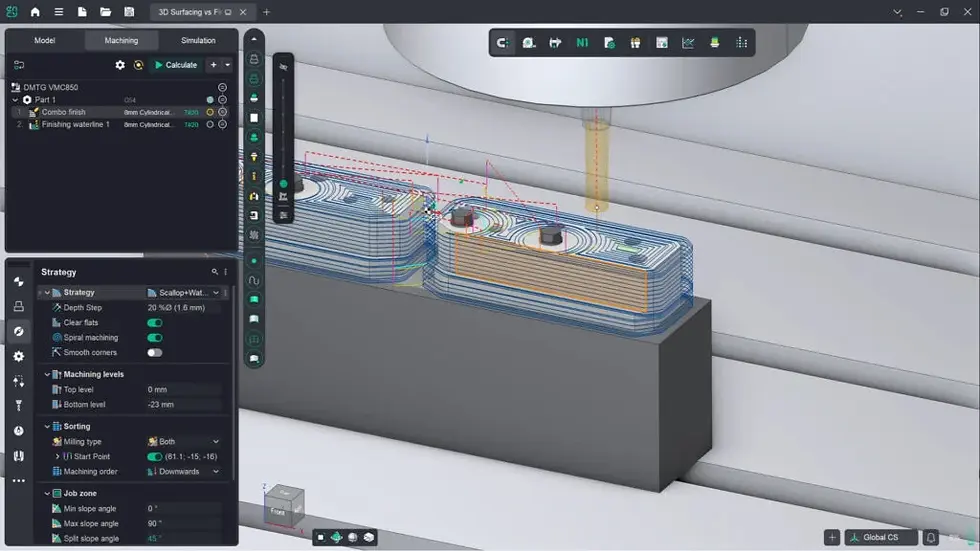
Toolpath generation – CAM software analyzes the CAD model and calculates the most efficient way to machine it, choosing tool types, cutting speeds, and movement paths.
Machine programming – The CAM software outputs G-code or similar machine instructions, which are sent directly to CNC machines, 3D printers, or laser cutters.
Production – The machine executes the program, producing the part with minimal manual intervention.
This pipeline turns a digital concept into a finished, physical product with remarkable speed and precision.
Core Uses of CAD/CAM in Manufacturing
Product design and prototyping CAD let engineers iterate on designs digitally, testing multiple versions of a part before committing to physical production. This dramatically cuts the time and material cost of prototyping.
CNC machining and toolpath generation CAM software automates the programming of CNC machines, which would otherwise require manually coding every cut and movement. This makes complex geometries — think turbine blades or intricate mold cavities — practical to produce.
Tooling, jigs, and fixture design Manufacturers use CAD/CAM to design the molds, dies, and fixtures needed to hold or shape parts during production, ensuring everything aligns with tight tolerances.

Simulation and error prevention Before a single piece of material is cut, CAM software can simulate the entire machining process, catching potential tool collisions, material waste, or design flaws early — saving expensive mistakes on the shop floor.
Reverse engineering CAD/CAM tools can convert 3D scans of existing physical objects into digital models, which is useful for replicating legacy parts that no longer have design documentation.
Quality control and inspection Digital models serve as a reference for automated inspection systems, which compare finished parts against the original CAD design to verify accuracy.
Mass customization Because digital designs can be tweaked instantly, manufacturers can produce customized or small-batch parts (like patient-specific medical implants) without retooling an entire production line.
Industries That Rely on CAD/CAM
Aerospace – complex, lightweight components with extremely tight tolerances
Automotive – everything from engine parts to dashboard molds
Medical devices – implants, surgical instruments, and prosthetics tailored to individual patients
Consumer electronics – enclosures, connectors, and precision components
Mold and die making – the tooling that shapes countless plastic and metal products

Why It Matters: The Business Case
Speed – Design changes that once took days can happen in minutes.
Accuracy – Digital precision reduces human error in both design and machining.
Cost savings – Fewer physical prototypes and less material waste.
Consistency – Every part produced from the same CAM program is virtually identical.
Integration – Modern CAD/CAM platforms connect with 3D printing, robotics, and factory automation systems, forming the backbone of "smart manufacturing."
Where CAD/CAM Is Headed
The next generation of CAD/CAM tools is leaning heavily into automation and intelligence. AI-assisted toolpath optimization, generative design (where software proposes optimal part geometries based on performance goals), and cloud-based collaboration are becoming standard features. As additive manufacturing (3D printing) matures, CAD/CAM software is also evolving to manage hybrid workflows that combine traditional subtractive machining with additive processes in a single production line.
Final Thoughts
CAD/CAM software isn't just a design tool — it's the connective tissue of modern manufacturing, linking creative design work directly to the machines that build physical products. By automating the translation from digital model to manufactured part, it has made production faster, more precise, and more adaptable than ever before. For any manufacturer looking to stay competitive, understanding and investing in CAD/CAM capability isn't optional anymore — it's foundational.


Comments